
HOW-TO: Create a Hoof Supervisor Export File for DairyComp

Follow these simple steps below for how to export your Hoof Supervisor data into DairyComp. This also applies to other herd software (see step 3).
Step 1: In Hoof Supervisor System, go to Farm Management > Select Herd > View Trim Lists
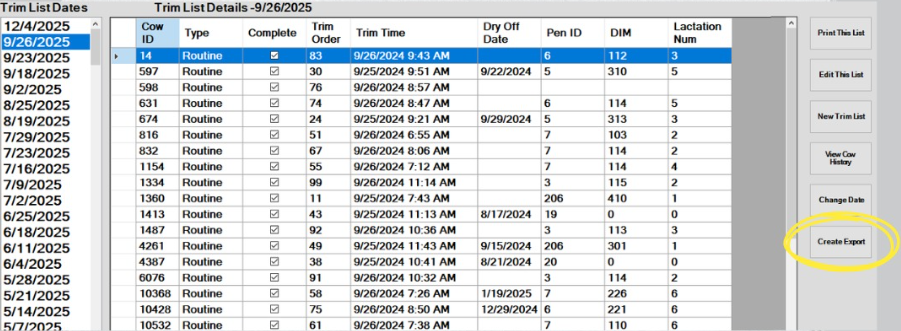
Step 2: Highlight trim session date to export > Create Export
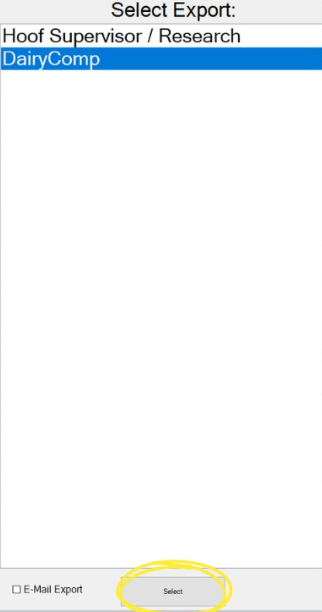
Step 3: Select DairyComp option > Select (*same steps apply for other herd software like PCDart, instead just select Hoof Supervisor/Research)
Step 4: The Windows Export File screen pops up > Select Removable Disk D:\ as the location to save the file. The filename below will be autofilled in this format: HSTrim HerdName TrimDate.csv > Save

Step 5: You will get a pop-up box when the file is finished > Export Complete > OK
Lastly, take the USB removable disk to the dairy’s DairyComp computer. They should have a ‘Get HSS’ tab located at the top toolbar after a DairyComp rep has completed the interface setup in their DairyComp.
Still have questions or need help? Call us @ 715-755-3575.