
HOW-TO: Take a Backup from Feed Supervisor

We encourage you to take regular backups of your data. We also recommend storing this valuable data somewhere besides just the computer, like a USB flash drive, incase something happens. You might be glad you did! Follow the steps below to make sure your data is safe and secure!
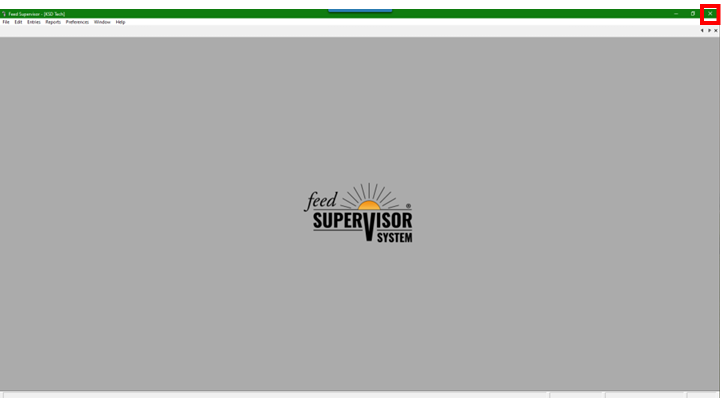
Step 1: Click the X in the top right corner of the program to close.
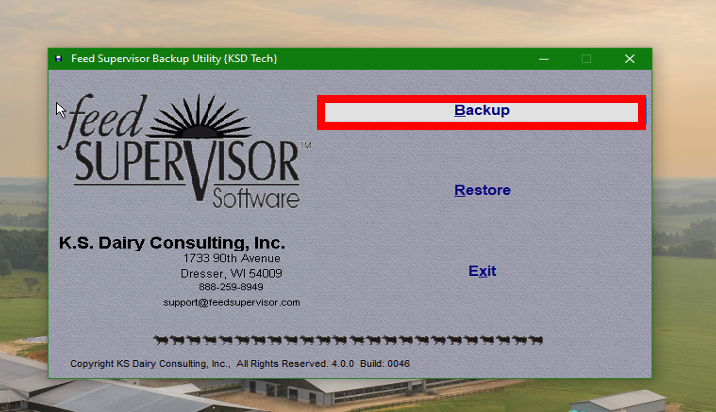
Step 2: The Backup Utility screen will pop up automatically. Click Backup.
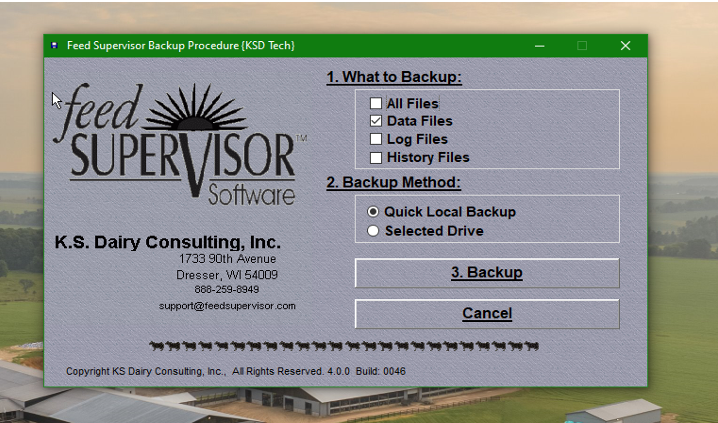
Step 3: First, select which files you would like to backup. “Data files” are usually sufficient for consulting, nutrition work, etc. but a full backup will work as well. Next, choose “Selected Drive” in the Backup Method. Finally, click Backup. You will be prompted to select a save location. For easy access it is recommended to save to the desktop or to a USB drive.
Still have questions? Call us @ 715-755-3575.